
Across accounting firms, professional services and mid-to-large sized businesses, Power BI has become the backbone of management reporting. As this usage across multiple types of businesses and industry verticals has grown, the central question is: how do you deliver Power BI to clients securely, professionally and at scale?
This question is coming at a time when organisations are increasingly shifting from internal only dashboards to external facing ones; with clients wanting the ability to ‘see’ what is happening in their businesses via a ‘single pane-of-glass'. This in turn creates a new requirement for Power BI Solutions Architects to ensure that they are providing clients, partners or investors with secure access to live, meaningful data.
Power BI is now such a powerful tool for accountants and consultants seeking to better understand their clients businesses that it is no longer optional; it’s fundamental. Firms are embedding Power BI into their client experience to differentiate themselves, deepen relationships and deliver real-time advisory value.
This new paradigm is best illustrated by the fact that the Chartered Accountants ANZ even revamped its CA Program to include Data Analytics and Insights built around Power BI. Universities are also following this trend, with growing enrolments in Business Analytics and Data Analytics programs replacing traditional accounting pathways.
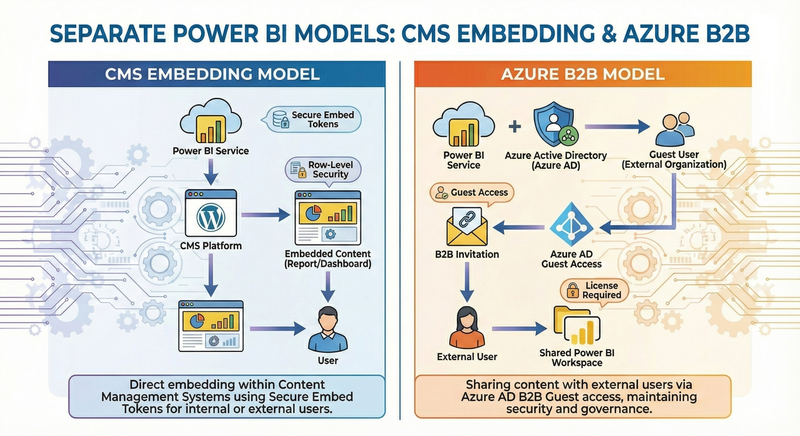
It is in this context that we are seeking to understand the differences between CMS embedding and Azure B2B for delivering client-facing Power BI access, helping organisations choose the most secure, scalable and cost-effective model. Now let’s look at the options around optimising, how internal teams and external clients interact with Power BI.